
What is Validation in OnStyle?
Validation in OnStyle is a process that inspects a Word document for formatting, style, and structural issues in accordance with predefined company or industry standards. It helps ensure compliance by identifying inconsistencies and errors, then providing options to correct them.
How Validation works
Section titled “How Validation works”Validation is performed by running Inspections. An Inspection in OnStyle refers to the act of checking a document against a particular formatting rule. The output of the validation process is the issue found and listed on the Inspection Results pane.
Using the Validation tools, you can run:
- An Inspection Module – the smallest validation unit, checks a specific type of formatting or style-related issue (e.g., missing captions, non-black text).
- An Inspection Group – a collection of related inspection modules, organized to search for specific categories of issues (e.g., headings, formatting, hyperlinks). Groups make it easier to run multiple checks at once, rather than checking each module individually.

Click to enlarge
- An Inspection Set – a collection of inspection groups and/or inspection modules that can be executed together
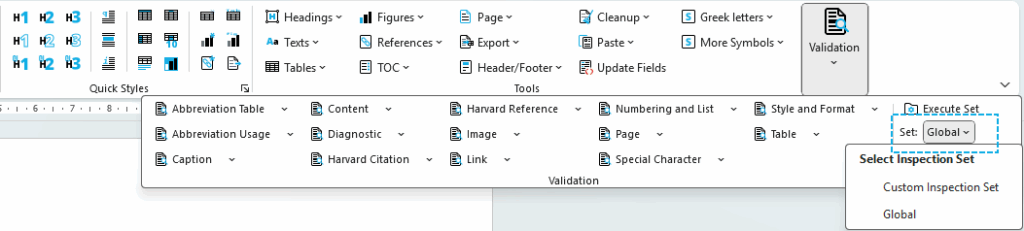
Click to enlarge
Once a validation is executed, OnStyle scans the document for specific errors or inconsistencies and displays the results in the Inspection Results pane. Issues are organized by group/module, with details and recommended fixes. The pane can be viewed in Tree, Table, or Flat view, making it easier to navigate, review, and apply corrections.
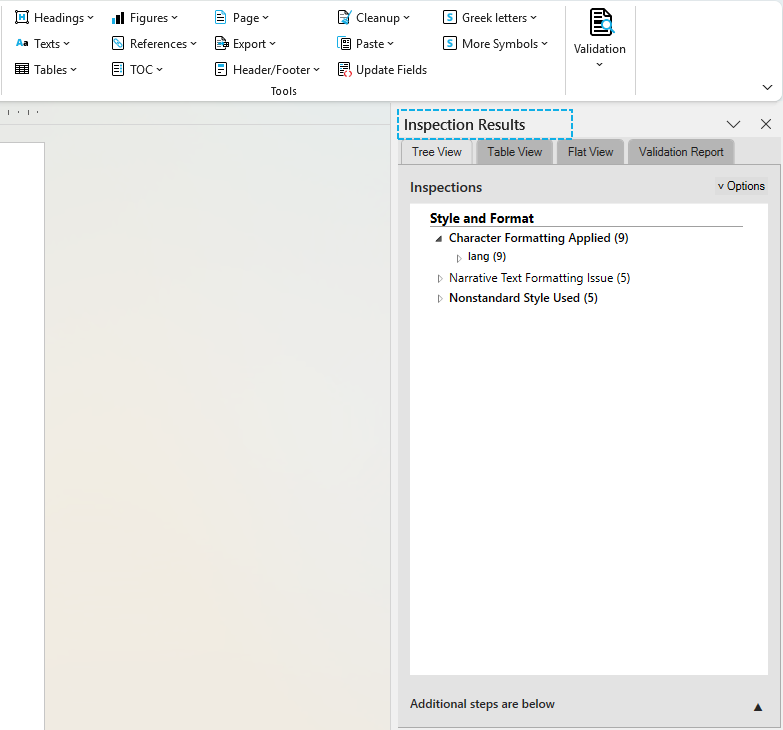
Click to enlarge
Corrections during validation
Section titled “Corrections during validation”Validation not only highlights issues but also provides correction options. Some corrections can be applied automatically, such as fixing table headers or adjusting caption formats. Inspection modules that have automatic fix options are displayed in bold for easier recognition. Others may require manual correction. Fixes can be applied to a single issue or all issues of the same type.
When to use validation
Section titled “When to use validation”Run validation
- before finalizing a document to ensure compliance,
- on large or complex documents where manual review would be time-consuming,
- or at intermediate stages during authoring to catch issues early