
Executing Inspections
This article explains what inspections are and how to run an inspection module, group, or set in OnStyle. It also outlines the differences between Global and Custom Inspection Sets.
What is an Inspection, an Inspection Group, and an Inspection Set?
Section titled “What is an Inspection, an Inspection Group, and an Inspection Set?”The Inspection Module is the basic unit of validation designed to detect a specific type of formatting or style issue. Inspections can be grouped (Inspection Group), and groups can be organized into sets (Inspection Set).
Inspection Groups are predefined lists of Inspection Modules. Each group is designed to check for a particular set of issues, such as formatting errors or problems in document elements like headings and hyperlinks.
An Inspection Set is a collection of Inspection Groups .
There are two types of Inspection Sets:
- Global Inspection Set: A predefined, built-in, and not editable by users (read-only).
- Custom Inspection Set: Configurable by users
With one click, you can run a single inspection, an inspection group (all active inspections within that group), or an inspection set (all active groups within that set).
How to Execute a Single Inspection
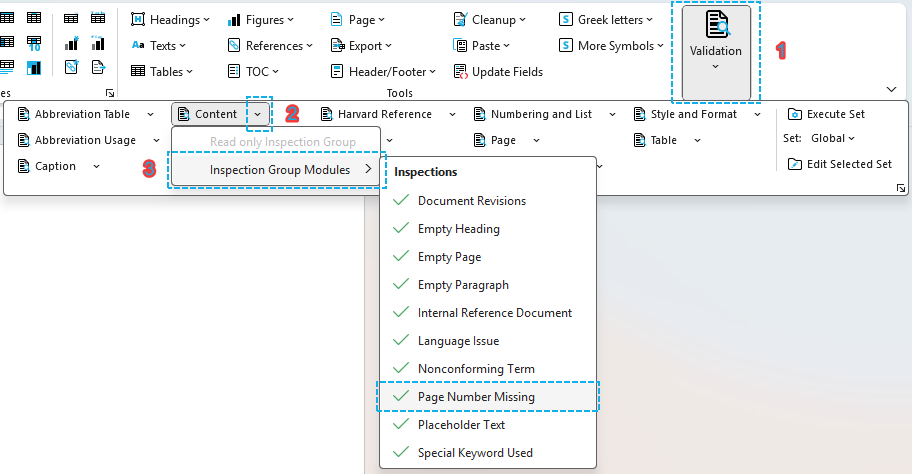
Section titled “How to Execute a Single Inspection”- Locate the ‘Validation’ tool group on the OnStyle tab.
- Click the down arrow of any inspection group to open its drop-down menu. If you click the group name instead, all items of the group will run.
- From the drop-down, choose ‘Inspection Group Modules’, then select the desired inspection (e.g., ‘Page Number Missing’) to begin validation.
- OnStyle will then validate your document using the selected inspection. The selected inspection module can be executed even in an inactive state.
Click to enlarge
How to Execute an Inspection Group
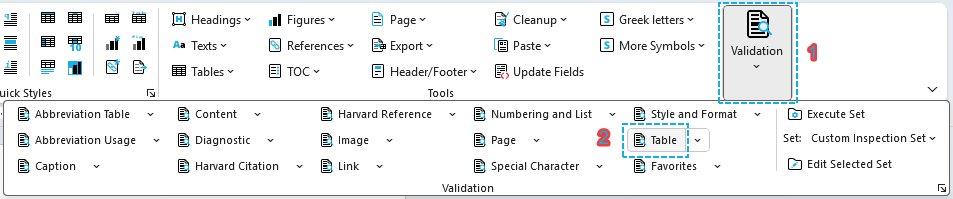
Section titled “How to Execute an Inspection Group”- Navigate to Validation tool group on the OnStyle menu.
- Click the name of the Inspection Group
- OnStyle will validate the document using all active Inspection Modules of the Inspection Group.
Click to enlarge
How to Execute an Inspection Set
Section titled “How to Execute an Inspection Set”To execute a set of inspections:
- Open your document in Word.
- On the OnStyle ribbon, locate ‘Validation’ tool group.
- Choose Global or Custom Inspection Set. (Custom Inspection Set is available in Professional version only).
- Click Execute Set.
- OnStyle will then validate your document using the selected set of inspection modules.
- Review the findings displayed on the Inspection Results pane.