
Edit fasterReview lessSubmit sooner
Automated Document Formatting & Validation Software for Microsoft Word
OnStyle is a document formatting and validation software built directly into Word helping regulatory document writers and quality controllers standardize documents, automate formatting, and prepare submission-ready documents faster.
- Enforce document standards automatically
- Reduce formatting errors in Word
- Automate document formatting
- Perform document quality control before review
- Prepare submission-ready regulatory documents
- Standardize Word documents across teams
Struggling with Word formatting problems?
If you work with complex Word documents, you’ve likely encountered recurring formatting issues.
…and each one costs you hours.
What is OnStyle?
OnStyle is a Microsoft Word add-in for document formatting, standardization, and automated validation. It combines:
- Document formatting automation
- Automated correction modules
- Word productivity tools
- Document workflow automation
One-Click Table of Contents, List of Figures, Tables, and Appendices
Insert each list all at once, correctly structured, consistently styled, and aligned with your document’s formatting rules. Eliminate Word’s TOC issues regarding localization differences with OnStyle’s custom TOC insertion method.
Customizable OnStyle Ribbon
Leverage the configurable toolbar with preferred authoring tools and formatting controls.
Easier Symbol Insertion
Keep frequently used symbols readily accessible on the OnStyle toolbar, formatted to match your template.
Automated Table Insertion
Add preformatted tables that match style and layout requirements.
Standard Headers & Footers
Apply global or document-specific headers and footers based on your style guide.
Smart Paste
Use intelligent pasting that adapts to formatting rules.
Simple Page Orientation Change
Modify page orientation of the selected content in one click. Tables and content adapt automatically.
Standard Updates in One Click
Apply company-wide or multiple regulatory standards instantly to your document.
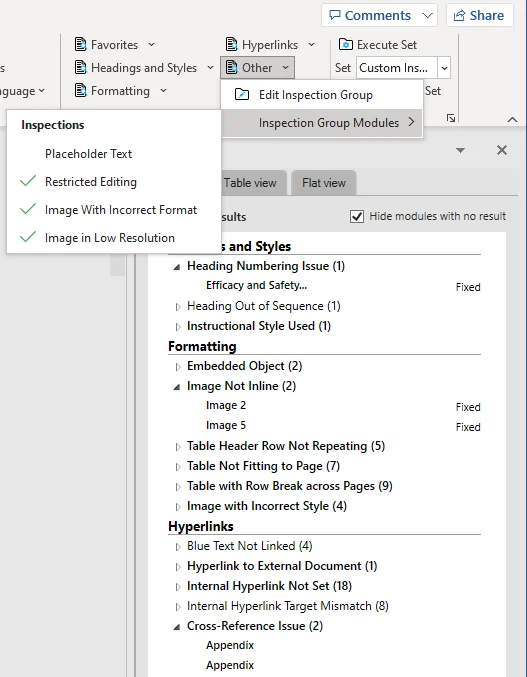
150+ automated Word checks and fixes
OnStyle currently performs over 150 automated checks and over 120 corrections in Microsoft Word, including:
- Abbreviation table creation and validation
- Hyperlink checking and blue-text detection
- Cross-reference errors
- Embedded object identification
- Headings correction and structure validation
- Images
- Incorrect or missing captions
- Nonstandard page layout
- Protection issues and embedded restrictions
- Table formatting and layout inconsistency
- …and many more
Why Teams Choose OnStyle

Reduce review cycles

Eliminate formatting errors before submission

Enforce document standards across teams

Save hours on large documents

Convert to new standards instantly
Trusted by
3,000+ users formatting documents with OnStyle across our customers.





How OnStyle works
Apply your document standard (DocConfig)
At the core of OnStyle is DocConfig, your company’s formatting blueprint.
A DocConfig defines:
- Fonts and paragraph styles
- Table formats
- Caption settings
- TOC, List of Figures, List of Tables
- Page layout
- Language settings
- Header & footer rules
When applied:
- Styles update automatically
- Layout adjusts instantly
- Authoring tools configure to your standards
Write with built-in Word automation tools
Draft your document with OnStyle’s authoring tools — one-click TOC and list insertion, preformatted tables, symbol insertion, and Smart Paste — so content lands correctly formatted as you write.
Run automated document validation
Check the document against your DocConfig before review. OnStyle validates formatting, styles, captions, cross-references, and layout — and lists every issue it finds.
Fix issues automatically or manually
Correct flagged issues in bulk with automatic fixes, or step through them one by one — keeping full control over the final, submission-ready document.
Built for documents where formatting is a compliance matter
Any large, complex Word document where consistency is non-negotiable.
Ready when your deadline isn’t.
Technical Requirements
- Windows 10 or 11 (Mac not supported)
- Microsoft Office 2016, 2019, or 365 (Desktop, 32/64-bit)